Opened from an app? For best results, open this page in Safari or Chrome first (look for Open in browser in the app's menu).
Welcome back
You have a prompter in progress: Your materials.
Continue your prompterLike a teleprompter for video interviews, with short cues from your resume and the job posting.
Bring confidence to your next interview.
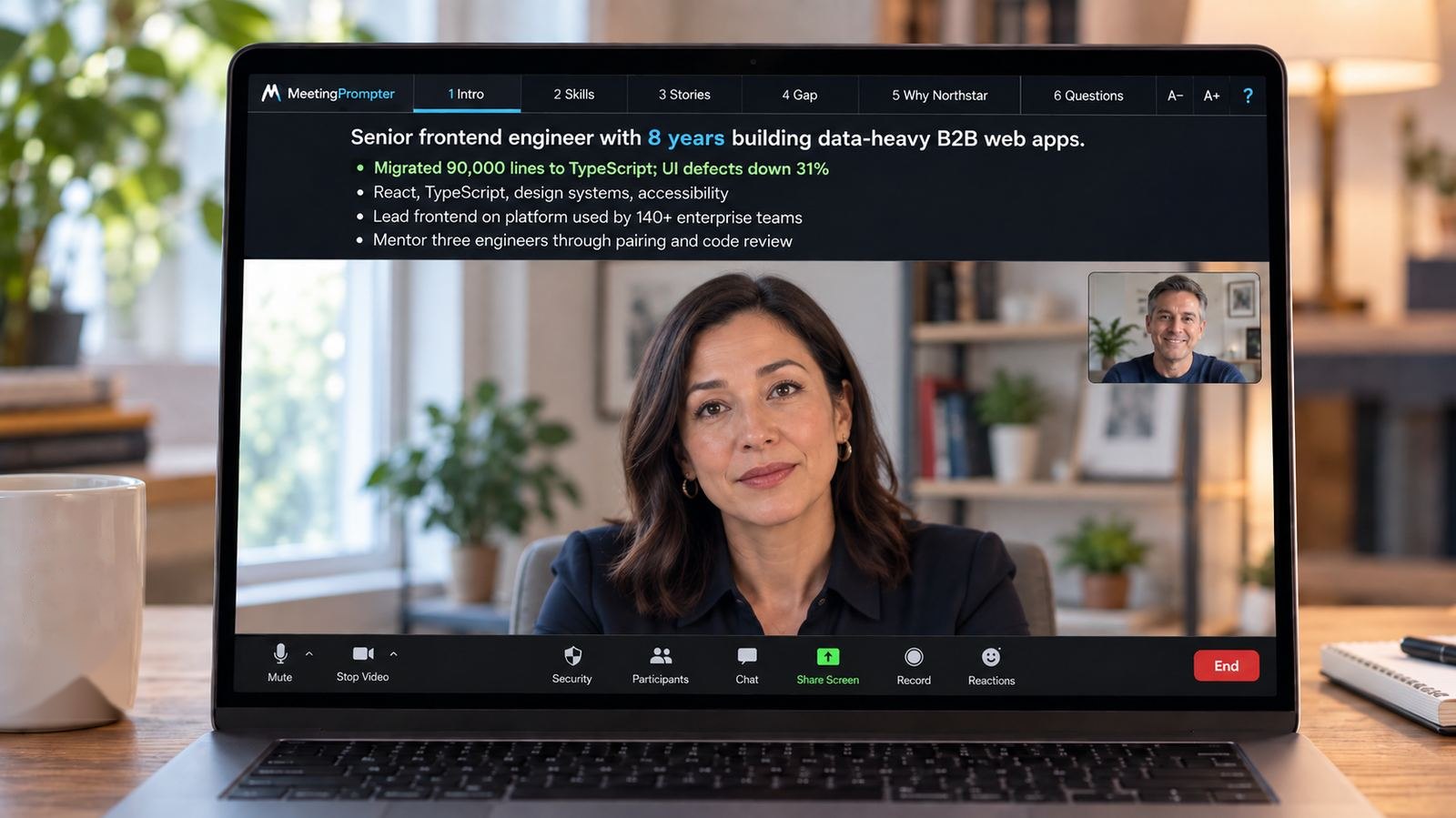
MeetingPrompter turns your resume and the job posting into short prompts next to your camera. If your mind goes blank, your key points are there.
Try 2 sections free See a sample prompter
Add your resume and the job posting, answer a few quick questions, and see two of your own interview cues before you pay. No card needed.
$2.99 per job. No subscription.
What you get
- Your best examples, right there. You can listen instead of trying to remember everything.
- Built from your real experience and tailored to this job.
- Worried about a question? Tell us what's on your mind, like a gap, a career change or a skill you're still building. Your prompts can include short talking points for it.
How it works
- Add your materials. Paste or upload your resume and the job posting. MeetingPrompter picks out the experience that fits this role. Answer a few quick questions if you like.
- Review your prompts. Edit anything, or ask AI for a new version. Reading them over is good practice for the interview.
- Download your prompter. Place the slim strip near your camera, with Zoom, Teams or Google Meet just below it.
Try a sample prompter first. No payment needed.
Private, and in your control
- During your call, nothing listens or records. Every word is yours.
- We don't keep your resume or job posting on our server. Contact details are removed before the AI sees anything.
- Your work stays in your own browser. Clear it any time.
Get your prompter
This usually takes a few minutes, sometimes longer. You do not need to pay again.
Includes 6 AI drafts and 30 days of access.
No subscription. No account needed. Use it on a laptop or desktop computer, in Chrome, Edge or Safari.
Buying another starts a fresh prompter in this browser. Download your current one first.
Not useful? Email us within 72 hours and we'll refund your purchase. One refund per customer.
Already paid? Find my purchase
Enter the Transaction ID from your PayPal receipt email.
Common questions
Is it OK to use notes in a video interview?
Yes, in most video interviews. Many career advisors suggest keeping a few brief notes nearby. Short cues help you stay on track without reading.
If an employer gives you specific rules, follow them.
Can the interviewer see my prompter?
No. MeetingPrompter runs in a separate window on your computer. It isn't visible through your camera.
If you need to share your screen during the interview, share the specific window you want them to see rather than your entire desktop.
Does MeetingPrompter listen to my interview or generate answers?
No.
AI is used before the interview to help you prepare your prompts. During the interview, MeetingPrompter is simply displaying the material you've already reviewed and approved.
AI helps you prepare. You handle the interview.
Can I try it first?
Yes. Add your resume and the job posting and we'll write two sections of your prompter free. If you like them, unlock the rest for $2.99 per job. No subscription.
What if MeetingPrompter isn't useful to me?
Email us within 72 hours and we'll refund your purchase. One refund per customer.
No complicated refund process.
Your key points, right next to your camera.
Try 2 sections freePayment complete. Thank you!
Important: save this link
Your work is saved in this browser. This link keeps your purchase usable for 30 days on any computer. A new browser starts again from your materials.
Lost it? Use "Find my purchase" with your PayPal receipt.
You can prepare on this phone or tablet. The finished prompter runs on a laptop or desktop, so at the end you'll send the file to your computer.
Your materials
Your free preview
How your free preview works
- Add your resume and the job posting.
- Answer a few quick questions, or skip them.
- See two sections of your own prompter, free.
If you like it, unlock the full prompter for $2.99 per job. About 5 minutes.
Your browser isn't saving this page. If you close it, your preview will be lost. Unlock now or copy your materials somewhere safe.
Your free preview: 2 sections
These cues are built from your resume, this job posting and your answers. Lines marked AI-drafted were worded by the AI. Check them.
You can preview and prepare on this phone. The finished prompter runs on a laptop or desktop.
AI-drafted lines
🔒 Unlock the rest of your prompter
Your full prompter has 4 to 6 sections, planned for this job: more stories, questions to ask, why this company, and talking points for a gap or career change if you mention one.
Unlock your full prompter, $2.99
Get all sections, written fresh with your answers to a few quick questions. Edit anything or ask the AI to redo a section. Download your prompter. Includes 30 days of access.
You can preview and prepare on this phone. The finished prompter runs on a laptop or desktop.
$2.99 per job. No subscription.
Not useful? Email us within 72 hours and we'll refund your purchase. One refund per customer.
A few quick questions
Short answers help the AI find your best examples. Skip any you like.
Short answers make your free preview more specific. Skip any you like.
Your resume, the job posting and your answers are sent to our AI service to write your prompter. Skip anything you'd rather not share.
The questions changed a little. Copy any of these you still want into the boxes above.
Review your prompter
Click a topic in the preview to edit it below. Fix anything that is not right, then click Looks good. Not happy with a section? Click Redo with AI, say what to change, and the AI rewrites only those sections.
Lines marked AI-drafted were written by the AI, not taken from your resume. Check them carefully. To make words stand out, select them and click Bold or Highlight.
Your MeetingPrompter is ready
The prompter runs on a laptop or desktop. Tap Download, then email it to yourself (or AirDrop it to a Mac) and open it on your computer.
How to use it
- On your computer: double-click the downloaded file. It opens in your web browser (Chrome, Edge or Safari).
- Choose where your camera is, then click Start prompter.
- Open Zoom, Teams or Google Meet in a normal window just below (or above) the strip.
- If you share your screen, share a window, never your whole screen.
- Practice once before the real interview.
Not useful? Email us within 72 hours and we'll refund your purchase. One refund per customer. Email with your PayPal transaction ID.